A worktree and branch for each agent
Run several agents in one repo. Give each its own worktree.
Flockdeck runs Claude Code, Codex, Gemini or your own model side by side, and makes it one step to give each its own git worktree and branch, so parallel agents don't undo each other's edits.
Run it on your desk, or on hardware you already own (a spare machine, a NAS, a cheap VPS), and use your own Flockdeck from your phone through an optional hosted relay (free for 30 days, then £5 a month). Pair with a QR code. The app is free and source-available.
Install Flockdeck Source on GitHub
Free and source-available · Windows, macOS and Linux
One checkout, three agents
- claude-code
- codex
- gemini
Each can undo the others' edits.
A worktree and branch each
- claude-codefeat/api router.go
- codexfeat/ui app.css
- geminidocs/readme README.md
No shared files to overwrite while they work.
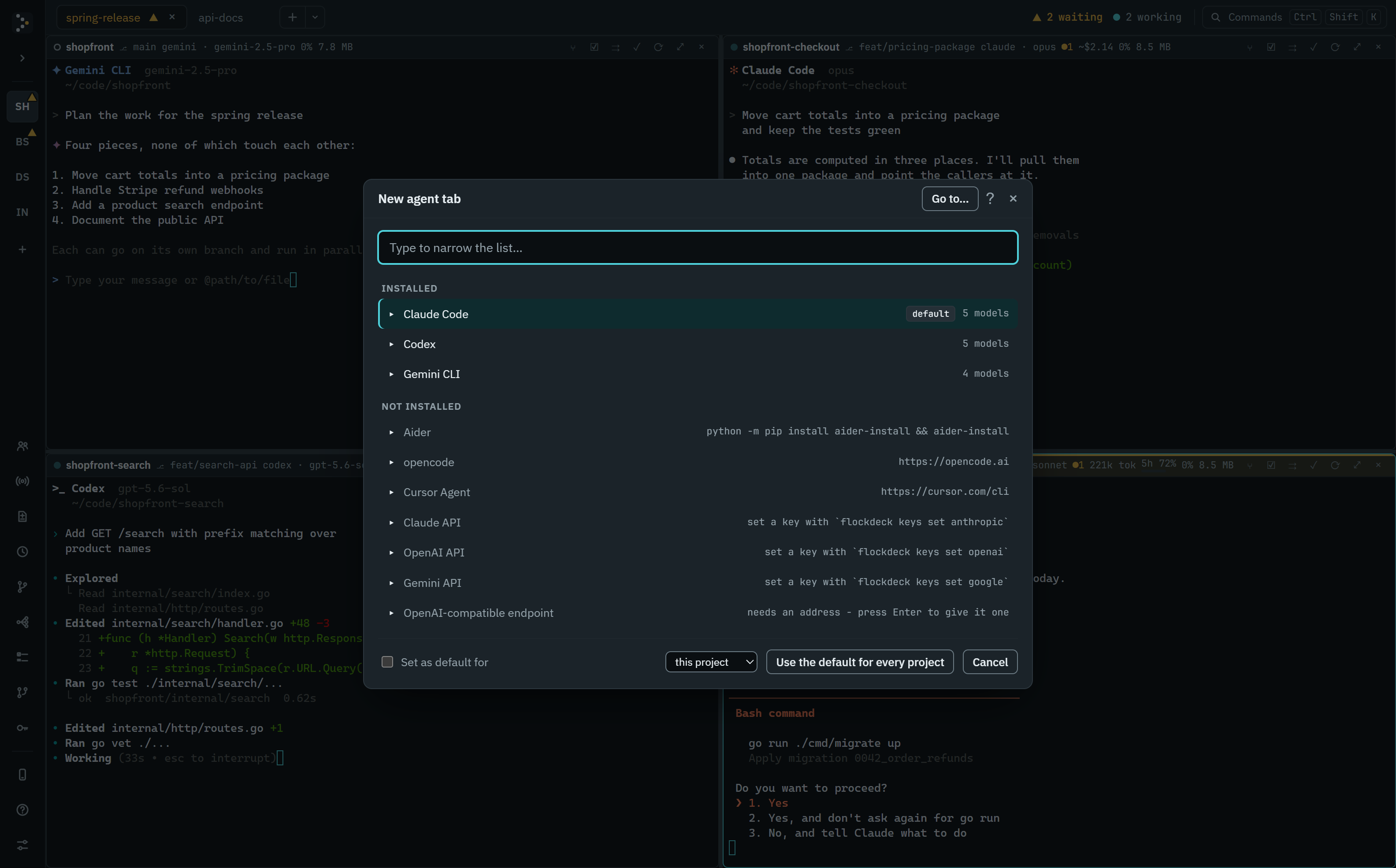
- Claude Code
- Codex
- Gemini CLI
- Aider
- opencode
- Cursor Agent
- Ollama and any OpenAI-compatible API
$ flockdeck — agent: claude-code
Reading internal/api/router.go
Edit internal/api/router.go +38 −12
Running go test ./internal/api/
ok  internal/api  1.284s
$ flockdeck — agent: codex
Reading internal/webui/assets/app.js
Edit internal/webui/assets/app.css +21 −4
▲ Permission needed
Allow write to internal/webui/assets/?
waiting for you…
$ flockdeck — agent: gemini
Reading README.md
Edit README.md +64 −9
finished its turn
One agent is easy. Five in one repo collide.
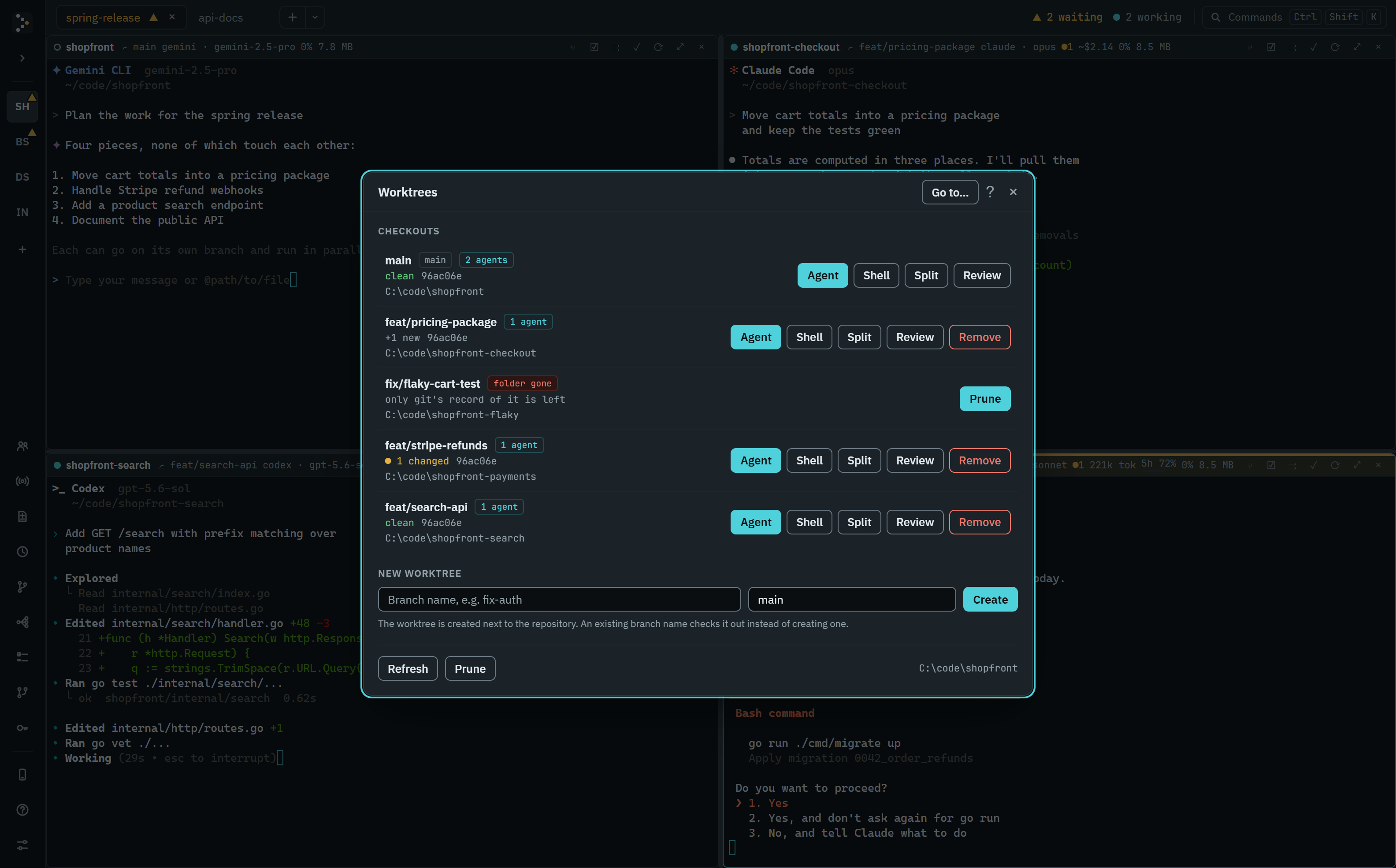
Agents working in the same checkout can undo each other's edits, or fight over who's on which branch. Flockdeck makes it one step to give each one its own git worktree and branch. The Worktrees panel creates one and opens an agent or a shell in it. The agents work in parallel without touching each other's files.
They also finish at different times and stop for permission prompts, so Flockdeck shows which agent needs you right now, and you don't have to flick between terminals to find out.
See it work.
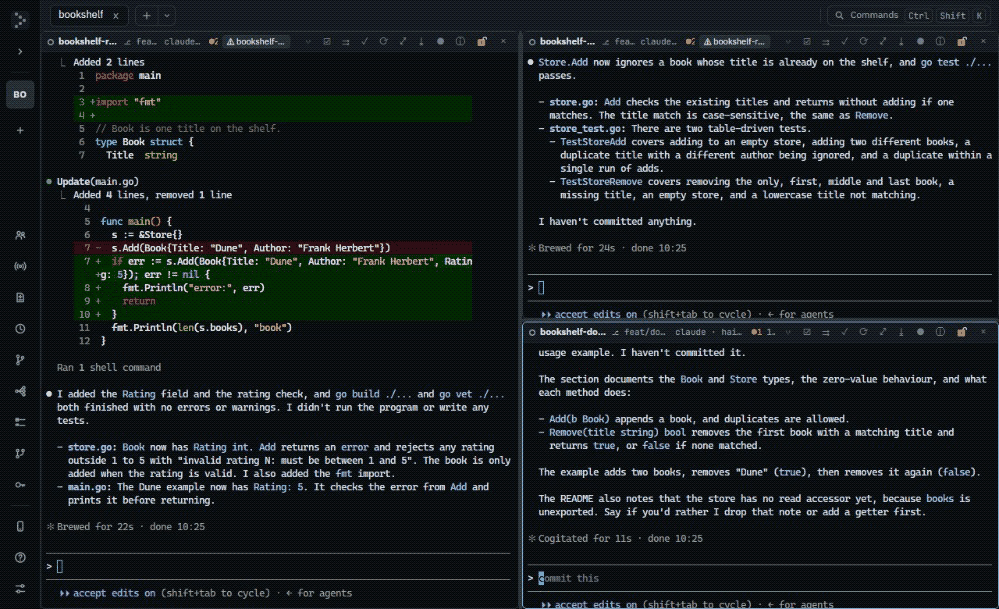 Play the recording (6.8 MB)Hide the recording
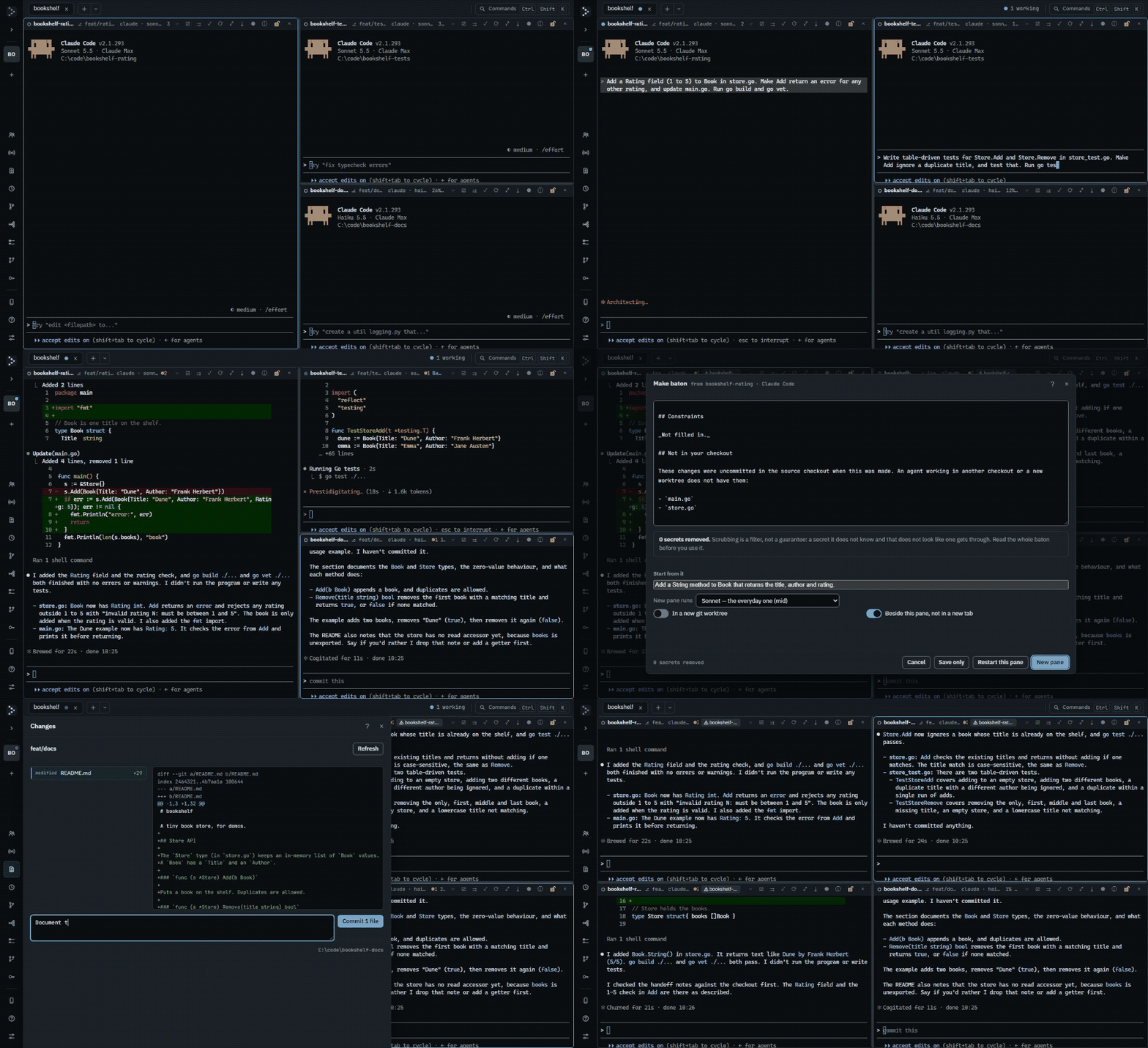
Every agent in one window.
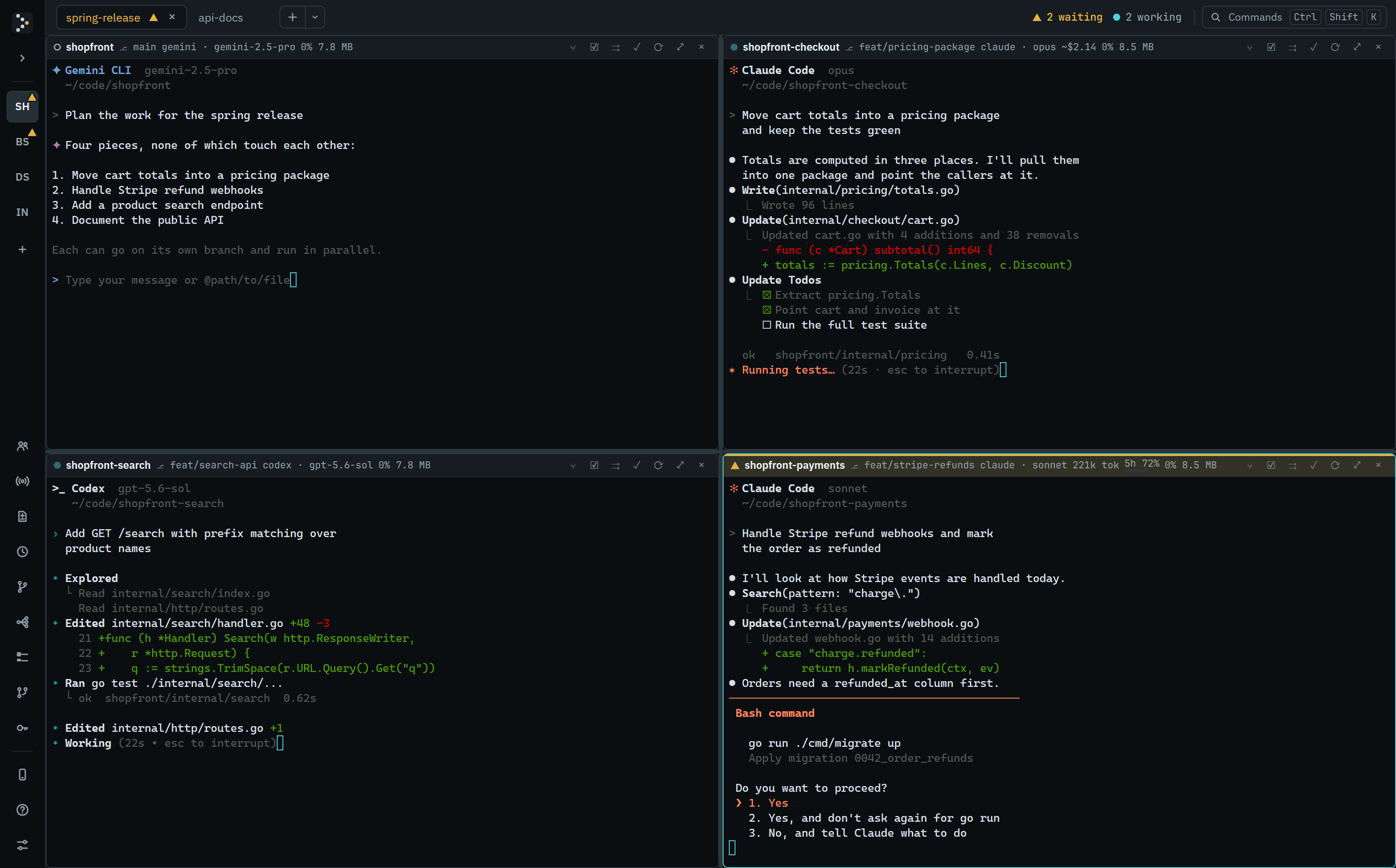
What it does.
Worktrees built in
Create, switch and clean up git worktrees without leaving the app, so your agents can work in parallel without touching each other's files.
Agents that know the team
Claude Code and the built-in API client are told which pane they're in and what the others are working on, so they can coordinate instead of colliding.
Know who needs you
Every pane shows whether its agent is working, waiting or done. Tabs and projects light up too, and you get a desktop notification when an agent is waiting while you're working somewhere else.
Every agent, every project
One list of every agent in every open project, each with its status, and a jump to any of them. The point is a calm overview, not running dozens at once.
Any agent, any model
Claude Code, Codex, Gemini, Aider, opencode and Cursor Agent. Or talk to a model API directly, including local Ollama and any OpenAI-compatible endpoint. Pick one per pane, and set a default for each project.
The right model for each task
Turn on routing for a project and a helper an agent starts, or the first prompt you send a pane, runs on a model that suits it: a smaller one to run the tests, a stronger one for a refactor.
Runs on hardware you control
Free to run headless on a spare machine, a home server or a VPS
(-no-window needs no browser there either). Use it
from your phone or laptop through the optional relay: pair with a QR
code. Flockdeck Remote is free for 30 days, then £5 a month.
See what each agent spends
API agent panes estimate what each conversation has cost. Claude Code panes show what they've used and how close a subscription is to its five-hour and weekly limits, where you have a status line of your own or once you turn it on in Settings. It's all worked out on your machine.
Pick up where you left off
Your layout and open projects come back when you reopen Flockdeck, and so do conversations with agents that can resume them. Choose Detach instead of quitting, and your agents keep running with the window closed. A past Claude Code conversation can be resumed in a new tab.
Review and ship
See every change an agent made, then commit and push it, without leaving the app.
Skip the questions that don't matter
Turn it on for a Claude Code pane and a plain read-only command inside
the project, such as git status or cat, goes
through without the pane turning amber. Anything that changes a file,
or that it isn't sure of, still asks you. Off unless you turn it on,
and kept per pane across restarts.
Keep a record of a conversation
Record a Claude Code pane, or export a conversation you didn't record,
as a transcript file with one JSON line per event, from the command
palette or flockdeck recordings export. Recording is off
until you turn it on, and secrets are removed on a best-effort basis.
Say it once
Write one prompt and send it to every agent in the tab, or to just the panes you pick.
Open your Flockdeck from your phone or browser.
Leave Flockdeck running at your desk, or headless on a server you own. Pick it up from a paired phone, tablet or browser: the same window, panes and terminals as at your desk. See which agent is waiting and unblock it there.
Outbound only
Your desktop connects out to the relay, so you open nothing on your router, and your machine listens for nothing from the network.
Pair in seconds
Scan a QR code or open a one-time link from your desktop. There are no passwords to set, and you can revoke any device at any time.
The complete Flockdeck
Every pane, every status and the agent picker. Claude Code and Flockdeck's own chat client open as a conversation, not a raw terminal, and the full interface is one tap away. Attach a photo or several, straight from the camera, and long replies, code and diffs fold so you're not scrolling past them.
Only your desktops
Your devices open your own Flockdeck and nobody else's. Terminal input and output are end-to-end encrypted on top of the TLS connection once the device and the desktop have each registered a key. The rest, such as a pane's state, its conversation view and photos, still reaches the relay decrypted. Trust & privacy spells out what is and isn't encrypted.
Or run it on a server instead
Flockdeck doesn't need a desk at all: start it with
-no-window on a spare machine, a home server or a VPS
(no browser needed there either) and pair it the same way. Your
agents run round the clock on hardware you control. The app is free;
reaching it through the shared relay is £5 a month after a 30-day
trial.
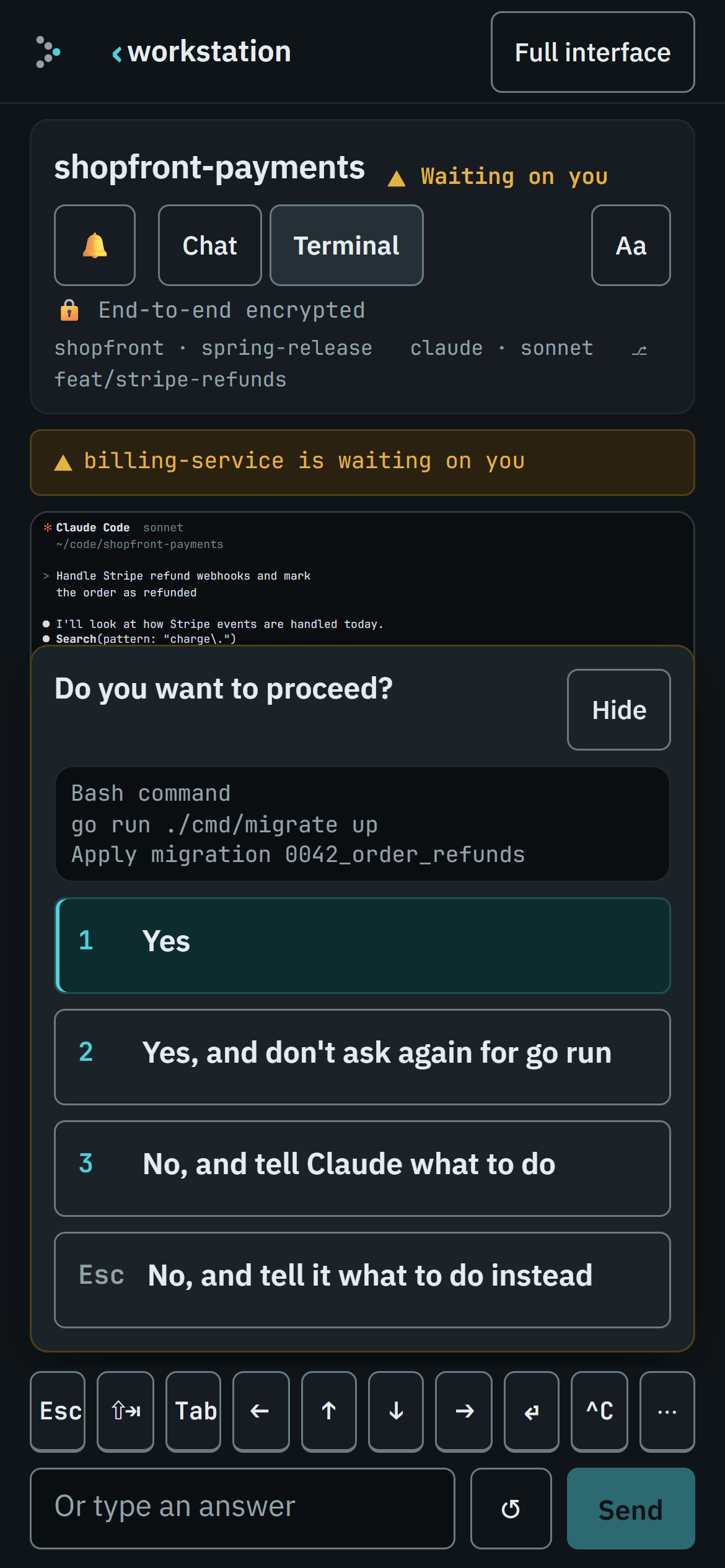
Turn it on in Settings › Flockdeck Remote, from the command palette, or from any terminal, then pair your phone:
flockdeck remote enable
flockdeck remote pair     # shows a QR code to scan
Flockdeck Remote is off until you
turn it on. Turning it off keeps your account, and
flockdeck remote remove removes the desktop from the relay.
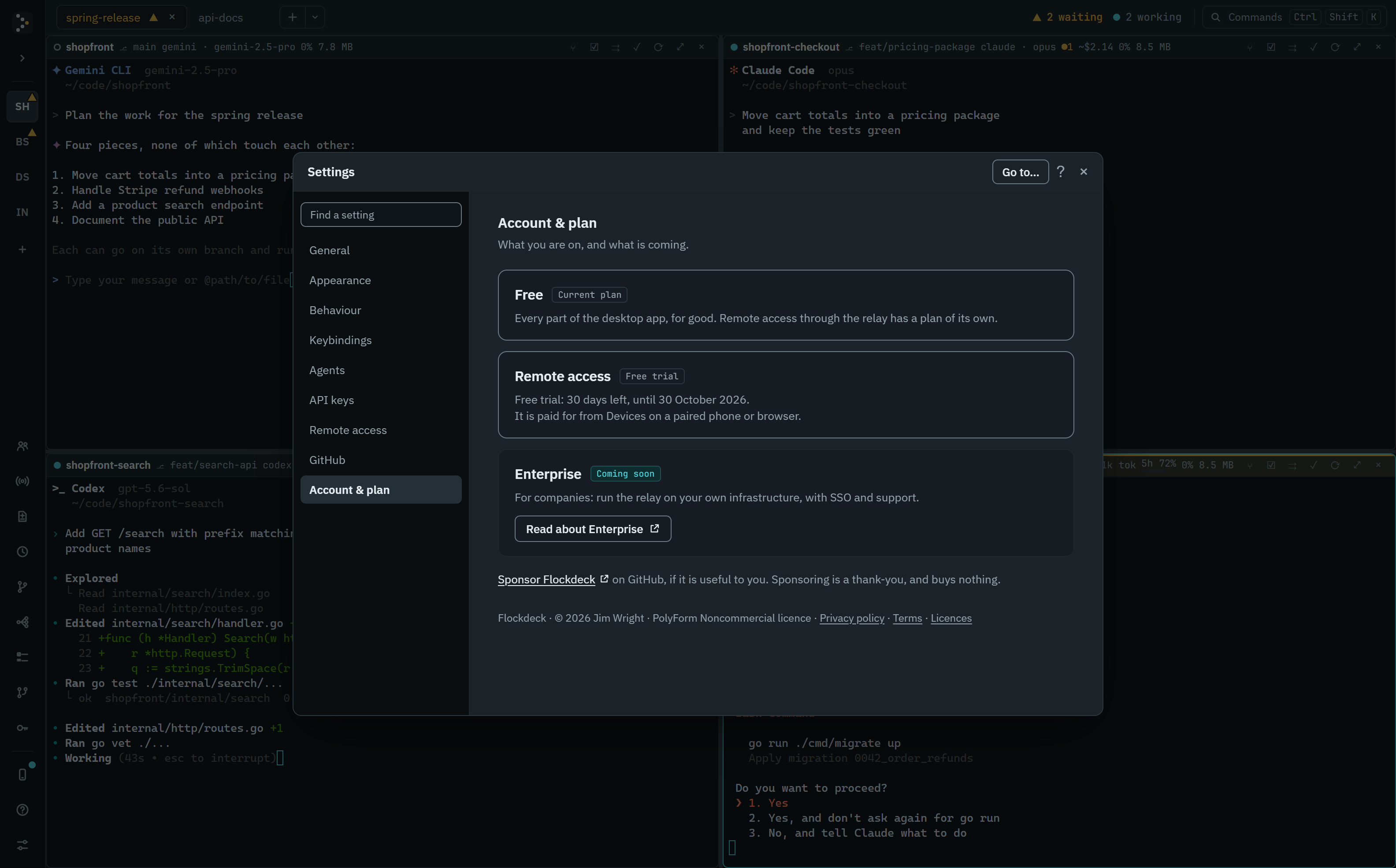
Enterprise
For companies whose rules don't allow a third party to decrypt their developers' traffic: a licensed, supported relay you run on your own infrastructure, with single sign-on. Coming soon, not yet generally available. The docs describe how the self-hosted relay works: self-hosting the relay.
Pick any agent. See every branch.
Up and running in one line.
For Windows, macOS and Linux, on Intel and AMD (amd64) or ARM (arm64) machines.
macOS and Linux:
curl -fsSL https://flockdeck.ai/install.sh | shOr download it:
Windows (PowerShell):
irm https://flockdeck.ai/install.ps1 | iexOr download it:
Each archive holds the program itself. On Linux and Windows
that is the one binary: unpack it and run it. On macOS it's a real,
double-clickable Flockdeck.app: move it into Applications and open it
from there, the Dock or Spotlight. Its checksum is in that release's
checksums.txt, and every release is also on
GitHub. Flockdeck is ad-hoc signed but
not notarized by Apple (notarization needs a paid developer account), so
opening a copy downloaded in a browser still shows a one-time "Apple
could not verify this app" prompt the first time. Allow it under
System Settings → Privacy & Security → Open Anyway, or run
xattr -d com.apple.quarantine on it. Windows may show a
similar SmartScreen prompt for a browser download; choose More info →
Run anyway. The install scripts above leave no download mark, so they
meet neither.
Windows also has a graphical installer, one file for x64 and
Arm. It asks for administrator approval, installs Flockdeck for every user
under Program Files, adds Start menu and desktop shortcuts and an entry
under Installed apps to remove it by, and fetches the WebView2 runtime if
the machine lacks it. It is not code-signed, so a browser download may
bring up the SmartScreen prompt described above, and Windows may name the
publisher as unknown. On Linux, the .deb (Debian, Ubuntu) and
.rpm (Fedora, RHEL, openSUSE) install
/usr/bin/flockdeck and an app-menu entry, and ask
apt or dnf for the GTK 4 and WebKitGTK
libraries it needs, for example
sudo apt install ./flockdeck_<version>_linux_amd64.deb
or sudo dnf install ./flockdeck_<version>_linux_amd64.rpm
(Arm machines take the arm64 files). Neither the installer
nor the packages are checked for you when they run: each one's checksum is
in that release's checksums.txt, which the
checksums.txt.sig beside it signs, so check it there before
you run one.
The install script checks its download against the checksum written into the
script itself, and installs it to ~/.local/bin, or to
~/Applications on macOS as a real Flockdeck.app. On
Windows it goes to %LOCALAPPDATA%\Programs\flockdeck and
adds a Start menu shortcut. With that in and checked, it moves you on to
the latest release, if this page is older than that, by asking the copy
it just installed to update itself. That update is checked against its
release signature, not against anything the script downloaded. No admin rights needed, now or
when Flockdeck updates itself. On macOS the command line is inside the
app, at ~/Applications/Flockdeck.app/Contents/MacOS/flockdeck;
add that folder to your PATH to run flockdeck commands. To pick a release or a directory, set
FLOCKDECK_VERSION or FLOCKDECK_INSTALL_DIR
first; each script lists its settings at the top. A release picked this
way is checked against the checksums.txt downloaded with it,
and is left exactly as installed rather than moved to the latest. To
also stop Flockdeck updating itself once it runs, set
FLOCKDECK_UPDATE=off where Flockdeck runs (with
setx on Windows, or in your shell profile). View the scripts: install.sh ·
install.ps1
Using Go?
go install github.com/jmwri/flockdeck@latestOr build from source:
make build      # a binary for this machine
make package    # archives for all six platforms
No make, as on many Windows machines? go build .
builds the same program. A build you make yourself doesn't update itself
unless it was built from a release tag: update it the way you installed it.
Flockdeck checks for updates, verifies every download and asks before it restarts, so an update never interrupts your work.
Command-line agents use the login they already have, so Claude Code works
with no extra setup. To use a model API directly, add your key with
flockdeck keys.
Press F1 in the app for the full guide and keyboard shortcuts, or read it at docs.flockdeck.ai.
Questions
Is Flockdeck free?
The desktop app is, for good: it's free, with its source available for noncommercial use, on your own computer or self-hosted on a server you run. Reaching it from your phone through Flockdeck's shared relay is free for a 30-day trial, then £5 a month. There's no permanent free tier for the relay, since somebody has to pay for running it.
If you'd like to say thank you, you can sponsor Flockdeck. It buys nothing: the app is the same for everyone.
Is there a paid version?
The shared relay is £5 a month after its free trial. Companies that can't have Flockdeck's relay in the loop at all have Flockdeck Enterprise, coming soon and not yet generally available: a licensed, supported relay they run on their own infrastructure, single sign-on included. The app stays free, with its source available.
Which agents does it work with?
Claude Code, Codex, Gemini CLI, Aider, opencode and Cursor Agent out of
the box. It can also talk to Anthropic, OpenAI and Google models
directly, or to any OpenAI-compatible endpoint such as Ollama. Any
other command-line agent can be added in agents.json.
Does my code leave my machine?
Flockdeck runs on your computer and doesn't collect your code. Your
agents talk to their own providers, just as they would in a terminal.
Flockdeck's own connections are dl.flockdeck.ai to check for updates,
with GitHub as a mirror; the relay, if you turn on Flockdeck Remote;
your git remotes, when you push, pull or fetch, and GitHub through the
gh command if you use its features; each model provider
you've given a key, to check the key and list its models; and
TypeSafe, only if you turn on its optional status detection. The exception is the built-in API
agents: they send your conversations to the model provider you
choose, with your own key. The cost estimates add no
connection of their own. The privacy
policy has the details, and trust &
privacy has the short version, including how that compares to
other coding assistants.
Do I need API keys?
Not for command-line agents. Claude Code and the others use the login
they already have. You only need a key to talk to a model API directly,
and flockdeck keys stores it for you.
Are the cost figures my bill?
No, they're estimates. An API agent's tokens are priced from a dated table of the providers' published prices, built into the app. Claude Code's figures come from its status line, by default only where you have one of your own: on an API key it shows its own estimate, and on a subscription the pane leads with your five-hour and weekly limits instead. Flockdeck works all of it out on your machine and sends it nowhere, except to your own paired devices with the rest of your panes if you turn on Flockdeck Remote.
Can I use it from my phone?
Yes. Turn on Flockdeck Remote and pair your phone with a QR code. A Claude Code pane, or Flockdeck's own chat client, opens as a conversation rather than a raw terminal: Markdown replies, diffs, and a question or permission prompt answered with a tap, even straight from the list of what's waiting. Long replies and code fold so you're not scrolling past them, and you can send a photo or several straight from the chat. You can search a conversation, and start a new agent without going to the desk. Everything goes over TLS. On top of that, what you type into a terminal and what the agent prints back is end-to-end encrypted between your desktop and your device once both have registered a key, so the relay passes it on without being able to read it. Until then it is protected by TLS only. The rest is not: the chat view of a conversation, what you search for, photos you attach, and each pane's status, spend and usage all reach the relay decrypted. You can also turn on notifications, so your phone tells you when an agent needs you and you're away from your desk. Those are end-to-end encrypted too: each one is sealed on your desktop for that device alone.
How do updates work?
Flockdeck checks dl.flockdeck.ai for new releases, with GitHub as a
mirror. It verifies every download against its published checksum,
accepts a release, from either place, only when the release key has
signed it, and asks before it restarts. If you
don't restart, the new version goes in the next time you quit. The
install scripts above do this once too, right after installing, so a
fresh install lands on the latest release even if this page was
generated for an older one. To turn updates off, set
FLOCKDECK_UPDATE=off.
How do I uninstall it?
If you turned on Flockdeck Remote, run flockdeck remote remove
first so the relay forgets this machine. Then quit Flockdeck and remove it
the way you installed it: through Installed apps for the Windows
installer, or with apt or dnf for the Linux
packages. For a copy the install script made, delete
~/Applications/Flockdeck.app on macOS; on Linux,
~/.local/bin/flockdeck and the Flockdeck entry and icon
under ~/.local/share; on Windows the
%LOCALAPPDATA%\Programs\flockdeck folder and the Flockdeck
Start menu shortcut, and remove that folder from your user PATH. Your
settings, layouts and keys are kept apart from it, in
%AppData%\flockdeck,
~/Library/Application Support/flockdeck or
~/.config/flockdeck; delete that too, and on Windows
%AppData%\flockdeck.exe, which holds the window's browser
profile. Worktrees Flockdeck
made are ordinary git worktrees beside your repositories, and stay
until you remove them.
Which platforms are supported?
Windows, macOS and Linux, on both Intel and AMD (amd64) and ARM (arm64) machines.
Say thank you.
Flockdeck is free, with its source available. If it's useful to you or your company, you can sponsor it through GitHub Sponsors. Sponsoring buys no features, support or priority: the app is the same for everyone.
Sponsors
No one is listed yet.
Sponsors are named here only if they ask to be, by name and a link.